When a suspicious file lands in front of us, jumping straight into a debugger or disassembler is not always the best place to start. Think of it like an autopsy. Before a detailed examination begins, basic information such as age, sex, height, and weight is recorded. None of these details explains the cause of death on its own, but they provide context and help guide the examination.
Malware analysis works in a similar way. Before digging into code, it helps to know what kind of file we are dealing with, which architecture it targets, whether it is native or .NET, whether it appears to be packed, and which compiler or toolchain may have been used. Detect It Easy, or DiE, is one of the tools that can provide this kind of initial context.
##Why DiE?
The goal of malware triage is not to fully understand a sample within a few minutes. The first goal is simply to understand what we are looking at. Knowing that a file is x86 can influence our debugger choice. Finding that it is a .NET assembly may point us toward tools such as dnSpy or ILSpy. A known packer detection may suggest that the code visible during static analysis is not the final code we actually want to examine.
For this reason, the information provided by DiE is useful not only as metadata. It can directly influence the next step of an investigation. Being able to identify the file format, architecture, compiler, section layout, entropy, and similar characteristics within a few minutes can save a significant amount of time during triage.
##What Is Detect It Easy?
Detect It Easy is an open-source static analysis and file identification tool designed to recognize executable formats and other binary structures. It is available for Windows, Linux, and macOS. Through a single interface, it can provide information about file type, architecture, compiler and linker signatures, packers or protectors, sections, entropy, imports, exports, and other structural characteristics. DiE is not limited to Windows executables.
Some of the formats it supports include:
- PE
- ELF
- Mach-O
- APK / DEX
- IPA
- ZIP / JAR
- Some legacy or specialized binary formats
In this article, however, the focus will be on using DiE for the initial triage of Windows PE files.
##First Look: Identifying the File
Opening a file in DiE gives us a large amount of information, but there is no need to inspect every field in detail during the first few minutes. A few basic questions are usually enough to begin.
###File Type and Architecture
On Windows, malware analysts commonly encounter PE files such as .exe, .dll, and .sys files. Architecture is important because it can affect the debugger and analysis environment we choose. For example, an x86 sample may be examined with x32dbg, while an x64 binary may be more suitable for x64dbg.
x86 -> x32dbg
x64 -> x64dbg
It may seem like a small detail, but identifying the architecture early prevents unnecessary time from being spent in the wrong environment.
###Native or .NET?
The distinction between native and .NET binaries can significantly change the analysis workflow. For a native PE file, tools such as x64dbg, IDA, or Ghidra may be appropriate. For a .NET assembly, tools such as dnSpy or ILSpy can often provide a much clearer starting point. Simply identifying a binary as .NET can therefore influence the entire next stage of analysis.
###Compiler Information
DiE may also identify the compiler or linker used to build a binary. Examples may include Microsoft Visual C++, MinGW, Delphi, or Go. Compiler information can be useful later when trying to understand runtime artifacts, compiler-generated code patterns, and the general structure of the binary.
###Packer / Protector and Signature Detection
Detect It Easy uses structural information and signatures to identify compilers, packers, and protectors and to report signature matches. For example, detecting UPX may suggest that the binary has been packed.
A packer's main purpose is to store executable content in a transformed form and restore it when the program runs. Packing is not unique to malware; legitimate software may also use packers to reduce file size or protect code.
Malware authors, however, may use packing to hide the original code, complicate static analysis, reduce the visibility of strings and imports, or make signature-based detection more difficult. In that case, the code, strings, and import table visible during static analysis may not represent the complete program.
The main question then becomes:
Do I need to unpack this file before I can properly inspect its real code?
That decision should not be based only on the packer name. Section layout, entropy, strings, imports, and other indicators should also be considered.
For example, sections named UPX0 and UPX1 can support an UPX finding:
UPX0
UPX1
When several independent observations point in the same direction, the packing hypothesis becomes stronger.
###Entropy
Entropy is another concept that frequently appears during malware analysis. In simple terms, entropy gives us an idea of how regular or irregular the byte distribution within a file or section is. Normal executable files contain code, strings, constants, and many recurring structures. Encrypted or compressed data often has a less predictable byte distribution. As a result, unusually high entropy may suggest possibilities such as encryption, compression, or packing.
High entropy alone, however, does not confirm any of these. A compressed image, archive, or other binary resource can also produce a high entropy value. For that reason, entropy becomes much more useful when it is interpreted together with other observations.
Entropy is therefore best treated as an indicator rather than a conclusion.
###Sections
PE files are divided into regions known as sections, each of which may serve a different purpose. During initial triage, there is no need to understand the entire PE format in depth. Recognizing a few common sections is usually enough.
- .text: Usually contains executable code.
- .data: May contain initialized data that can be modified while the program is running.
- .rdata: Often contains read-only data, constants, and some strings.
- .rsrc: Contains resources such as icons, manifests, version information, images, or embedded files.
- .reloc: Contains relocation information used when the image cannot be loaded at its preferred memory address.
Section names can also provide useful hints during triage. Unusual or apparently random section names may also be worth investigating further. At the same time, section names should never be treated as reliable evidence on their own. A packer or malware author can rename sections or use names that appear completely normal.
##Mini Triage
Now let's combine these ideas on a real sample. After loading the sample into DiE, I first look at its basic structure.
###General File Information
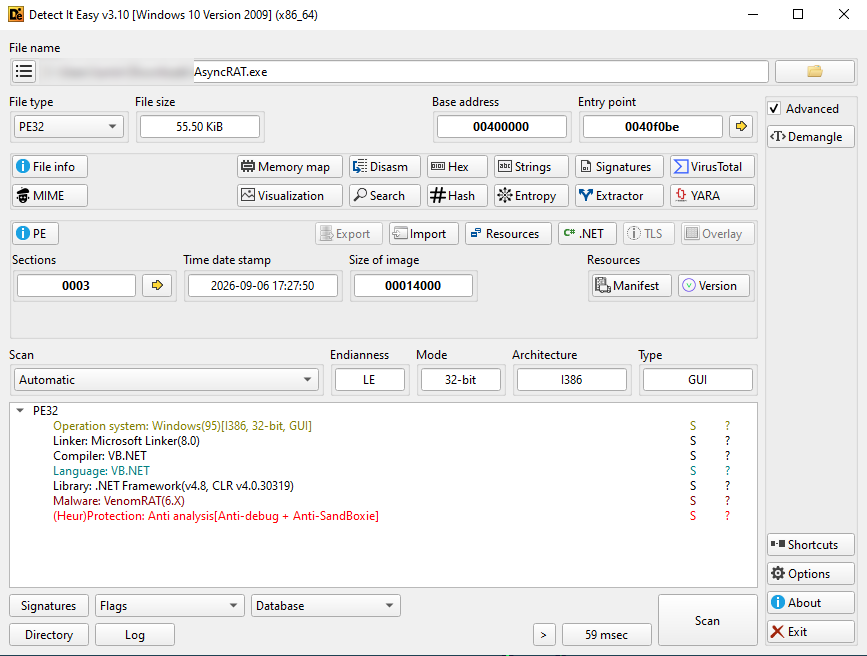
In the general file view, I see a PE32 sample targeting the 32-bit i386 architecture and using .NET Framework 4.8. This immediately shapes my next analysis step.
Because the sample is .NET-based, I would start with tools such as dnSpy or ILSpy rather than treat it as a native binary and immediately move into a traditional debugger. Microsoft Linker 8.0 and a VenomRAT signature match also stand out in the same view. I treat the VenomRAT result as a signature-based identification made by DiE rather than as definitive malware-family attribution.
I also see Anti-debug and Anti-Sandbox indicators. This makes me consider mechanisms that may detect analysis environments or debugger activity.
###Entropy
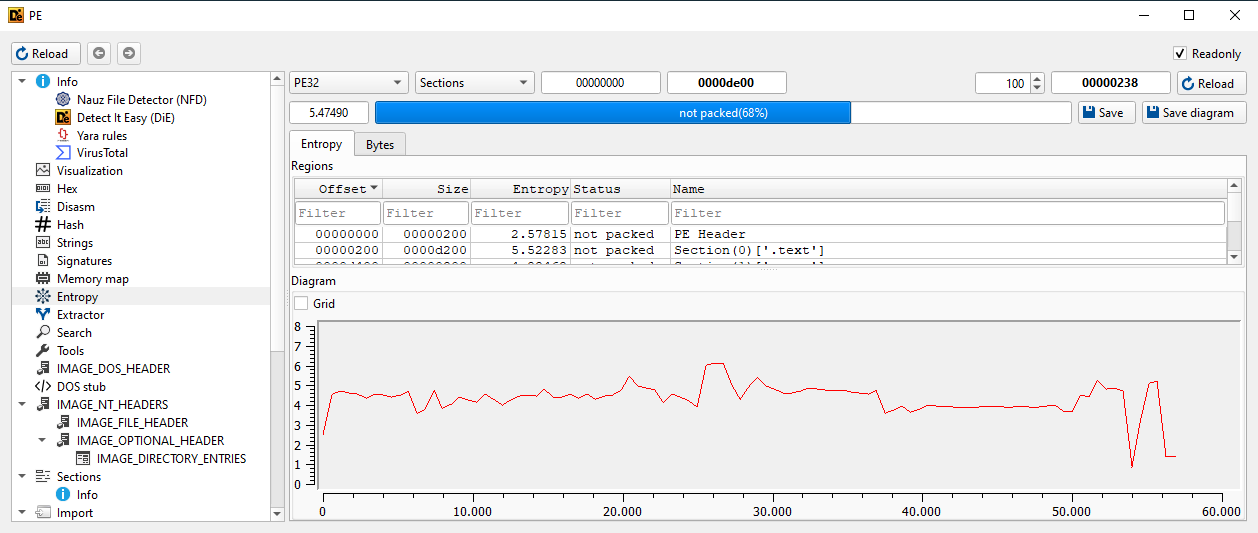
When I move to the entropy view, I see an overall value of approximately 5.47. The .text section is approximately 5.52, while the .rsrc section is around 4.88. I do not consider these values a strong packing or encryption indicator.
High entropy is not what stands out in this sample. This makes its .NET structure, signature result, and anti-analysis indicators more relevant to my initial triage.
###Section Layout
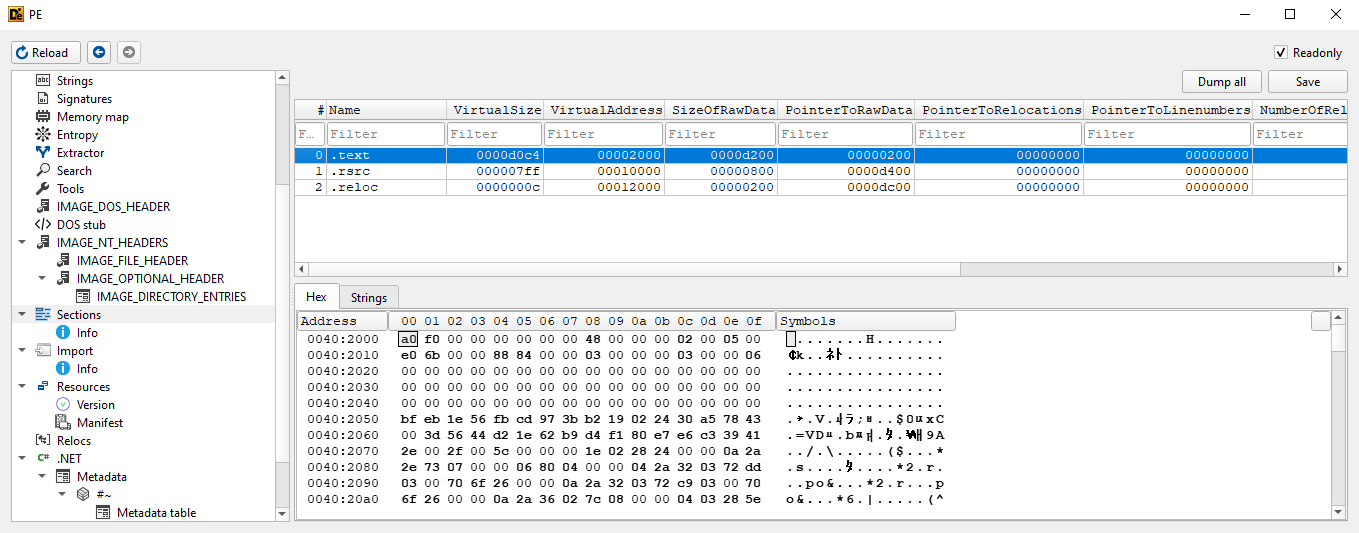
When I inspect the section table, I see three main sections:
- .text
- .rsrc
- .reloc
These names look fairly standard. I do not see obvious packer-related sections such as UPX0 or UPX1, nor do I see randomly named sections that immediately stand out. Together with the entropy values, this does not give me the typical appearance of a heavily packed executable.
###Initial Triage Result
After the first few minutes, I have a clear direction: the sample is 32-bit and .NET-based, while DiE reports a VenomRAT signature match together with Anti-debug and Anti-Sandbox indicators. At the same time, the entropy values and section layout do not show an obvious packing pattern. For this sample, I would therefore focus less on packing and more on the .NET structure, strings, configuration data, and anti-analysis checks.
The purpose of mini triage is not to completely solve the file, but to determine the next analysis step. DiE does not explain the full behavior of the sample, but it provides enough information within a few minutes to make the next analysis step more focused.
##What Detect It Easy Does Not Tell Us
DiE can reveal a great deal about the structure of a file, but it does not directly show the file's runtime behavior. Using DiE alone will not tell us exactly which process a malware sample may inject into, which registry keys it modifies, which command-and-control server it contacts, or which persistence mechanism it uses.
At that stage, we may need to move on to strings and import analysis, a disassembler, a debugger, or a sandbox. The information gathered during triage helps determine which of those tools makes the most sense next.
##Conclusion
Detect It Easy is a practical tool for quickly understanding the basic structure of a suspicious file before moving into deeper malware analysis. Architecture, .NET information, compiler signatures, packer detection, entropy, and section layout can provide enough context to choose a more appropriate next step.
The important part is not memorizing every value shown by DiE. It is understanding what each observation means for the investigation and what question it should lead us to ask next. In this article, we looked at the basic features of Detect It Easy that are useful during malware triage.
In the next DiE article, we will go further into PE analysis by looking at section anomalies, Raw Size and Virtual Size, section permissions, entry points, overlays, heuristics, and some of DiE's more advanced capabilities.
Stay with Malrev0x...